




As a car owner, you can expect your vehicle to throw error codes once in a while. To read and clear these error codes, you need a scan tool. However, there are instances where the scan tool won't communicate with the ABS.
Some common causes of communication problems between the ABS and scan tool include a failing battery, faulty ECU, and a loose connector. To fix the communication problem, you first have to find out the root cause of the problem. Then you can correct the issue.
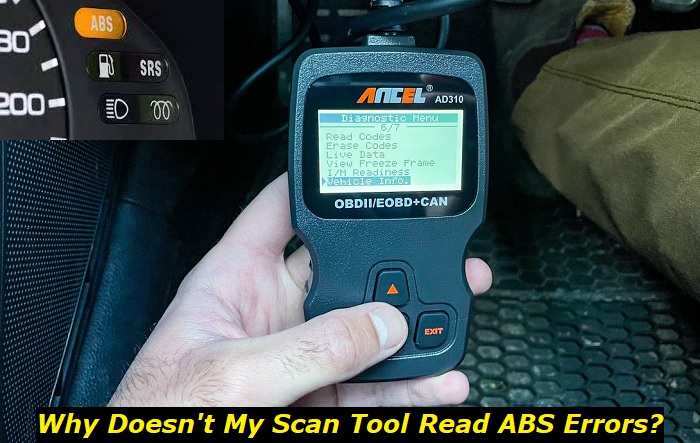
Using a scan tool is probably the easiest and cheapest way to diagnose the ABS. If your scan tool isn't communicating with the ABS, you might have to visit the dealership. ABS diagnosis usually costs between $80 to $120.
In this article, I'll talk about why the scan tool won't connect with the ABS and how you can fix it.
What is An Automotive Scan Tool?
A scan tool is a diagnostic device that can troubleshoot, read, and clear error codes when plugged into a car's OBD (On-board Diagnostic) port. These tools come in different formats and designs. Some scan tools have simple designs and features while others have wide screens and sophisticated features.
Most people refer to the scan tool as an OBD2 scanner. The reason is that you have to plug the scan tool into a universal connector known as the OBD2 port. All cars manufactured after 1996 have an OBD2 port.
The OBD2 port has 16 pins and wiring that connects it to the vehicle's computer. These pins can pull out diagnostic information from the computer on request. To get the information, you need to connect a scan tool to the OBD2 port.
The existence of an OBD2 port allows vehicles to monitor their systems. Also, technicians and car owners can easily get diagnostic information with the help of a scan tool.
What Scan Tool Can Read ABS Codes?
Apart from being connected to the car computer, the OBD2 port is also connected to the warning lights on the dashboard. Whenever the ABS light comes on, you can use an OBD2 scanner to troubleshoot.
So, do all scan tools read ABS codes? Not all scan tools can read ABS codes. There are different scan tools available on the market for different prices.
Of course, the high-end scan tools have more distinct features. Generic OBD2 scanners usually have simple features such as vehicle information, emission data, read trouble codes, and clear codes. These generic OBD2 scanners have a starting price of $25.
On the other hand, the mid-level and high-level scanners have more features. Some of these features include oil reset, ABS monitoring and bleeding, steering angle sensor reset, tire pressure monitoring system reset, and more.
Depending on the company, some scan tools have extra capabilities like graph data display, remote diagnostics, and online diagnostic reports. High-end scan tools can start at $100-$300.
To be sure that your scan tool can read ABS codes, you can check the owner's manual for its features. If you're about to order a scan tool online, check the description section for the features.
Why is My Scan Tool Not Communicating With The ABS?
Whenever you connect a scan tool to the OBD2 port, there should be a sign of response on the scan tool. However, there are cases where the scan tool doesn't react at all. Sometimes, you will even get a message that says "no connection".
There are a couple of things that can go wrong and cause communication problems between the scan tool and ABS. If you ever encounter this issue, unplug the scan tool and plug it in again. By doing this, you'd be sure that the problem is not an improper connection.
You might also want to test your tool scan on another car. With this, you can confirm if the problem is coming from the vehicle or the scan tool.
Here are some factors that might cause your scan tool to not communicate with the ABS.
1) Low Battery Voltage
As with many electronic devices, the scan tool needs power to operate. Car batteries store power and when the voltage gets low, other electronic accessories in the vehicle will malfunction.
The OBD2 connector on small cars has a power output of 12 volts. Therefore, your scan tool will most likely not communicate if the car's battery is low on voltage.
To confirm if your battery voltage is low, grab a voltmeter and do a simple test. In a 12-volt battery, anything from 12.35 volts downwards is low.
A faulty alternator and bad terminals are some of the most common causes of low battery voltage. Fortunately, there are many solutions to remedy a low-voltage battery.
2) Loose Connector Pins
In the automotive industry, there are two major types of OBD2 connectors. The small passenger cars have the type A connector with 16 pins. On the other hand, bigger vehicles have a type B connector with 24 pins.
These pins are responsible for extracting requested information from the car's computer. The pins have small openings where they receive plugs. Over time, the opening in pins expands.
Expansion of the female pin is a common cause of communication issues. You can fix these issues by yourself at home.
3) Faulty ECU
The ECU (Electronic Control Unit) is a computer that functions to make the car engine run smoothly. Some people even refer to the ECU as the engine's brain. In modern cars, the ECU plays a crucial role.
Essential car systems such as the engine, transmission, and brakes all rely on the ECU to function properly. A faulty ECU can cause the scan tool to have communication failure with the ABS.
If the ECU is faulty, the check engine light comes on. Other signs of ECU trouble include poor engine performance and misfiring. To fix a bad ECU, you have to visit a professional for testing and replacement of the affected components.
4) The Scan Tool is Not Compatible With The ABS
Earlier, I mentioned that not all OBD2 scanners can read ABS codes. If your OBD2 scanner has an ABS monitoring and bleeding feature, it probably won't communicate with the ABS.
When shopping for a scan tool, you need to ask yourself some questions. These questions will serve as a guide and help you choose the perfect scan tool for your needs.
First and foremost, ask yourself "What do I want to achieve with a scan tool"?. Then ask yourself about your budget.
If you just want to clear some engine codes, you can get a generic OBD2 scanner. However, you'll need a more sophisticated scanner if you intend to read ABS codes.
5) Ignition Key is Not In The Correct Position
Different companies make scan tools, so the user instructions are different. There's not one way to use a scan tool. Always consult the manufacturer's instructions to ensure that you're properly using the scanner of your choice.
For some scan tools, you have to place the ignition key in the 'run' position while the engine remains off. Placing the ignition key in 'run' allows the scan tool to receive power when you plug it in.
Most times, this method works only for basic scans. If you try to perform more functions with the scanner, it will prompt you to turn on the engine.
Other scan tools will prompt you to turn it engine on even for basic scans.
How To Fix Scan Tool Communication Failure
The first step to fixing a problem is to identify the exact cause of the problem. To fix scan tool communication failure, you have to first diagnose your car and find out what is at fault. Once you identify the fault, you can easily get a solution.
For instance, if you find out that your car battery's low voltage is responsible for the communication failure, you've solved half of the problem. From there you can decide your next action. You can choose to either jumpstart the car or charge your battery.
Here are some steps to follow if your scan tool won't communicate with the ABS:
- Unplug the OBD2 scanner and properly plug it in again.
- Ensure that you're using the correct scan tool that can read ABS codes.
- Make sure you're following the manufacturer's while using the scanner.
- Inspect the OBD2 connector and check for loose and bent pins.
- Use a probe tool or a paper clip to insert each pin. If you can feel some resistance, it means that the pin is in good condition. If there's no resistance, it's a sign that the pin is loose.
How To Fix Loose OBD2 Connector Pins
If you notice that some pins are loose, you fix them immediately. Follow these steps to tighten your loose connector pins.
- Locate the OBD2 connector socket beneath the steering wheel and gently pull out the connector.
- Use a paper clip to pop the lock at the top of the connector. Then use a probe tool to push down the clip between the terminals. The probe tool allows you to freely pull out the pins.
- Take note of the loose pins and the exact terminal you take them from.
- Gently pull out a wire from behind the connector. The top part of the pin has metal that sticks out.
- Use the probe tool to push at the sides of the pin. After some time, insert the probe tool inside the pin to check if it's tight.
- After you've achieved enough tightness, slip the pin up the terminal you took it from. Keep pushing it forward till you hear a click sound.
- Repeat the process for all the loose pins in the connector.
- Replace the connector in its socket. Then plug in your scan tool and check if it can communicate with the ABS.
About the authors
The CarAraC research team is composed of seasoned auto mechanics and automotive industry professionals, including individuals with advanced degrees and certifications in their field. Our team members boast prestigious credentials, reflecting their extensive knowledge and skills. These qualifications include: IMI: Institute of the Motor Industry, ASE-Certified Master Automobile Technicians; Coventry University, Graduate of MA in Automotive Journalism; Politecnico di Torino, Italy, MS Automotive Engineering; Ss. Cyril and Methodius University in Skopje, Mechanical University in Skopje; TOC Automotive College; DHA Suffa University, Department of Mechanical Engineering




Add comment